
Pyralink™ USB Firewall A USB-C firewall designed to block BadUSB keystroke injection
Plug in a stick or cable you don't fully trust. It is designed to block anything pretending to be a keyboard, and to let storage and charging through.
What is the Pyralink™ USB Firewall? A small USB-C adapter, in development, that sits between your computer and a USB stick or cable. It is designed to block fake keyboards (BadUSB keystroke injection) while letting storage and charging through. It is not designed to scan files. It is for UK addresses only, and you can reserve one at the early-bird price of £149 with a £25 deposit that is refundable in full on request before dispatch.
Designed in Britain
Joining the waitlist is free and takes no payment. Or reserve with a £25 refundable deposit. You can leave the list at any time. Delivery is to UK addresses only.
- By design:
- No app
- No account
- No cloud
- No data collection

Colour shown is a concept render; final finish may vary.
Watch: 45 seconds
Is that USB stick typing for you?
The problem: BadUSB and keystroke injection
A malicious USB stick or cable can pretend to be a keyboard
Your computer trusts keyboards. A hostile stick or cable can hide a tiny chip that says "I'm a keyboard", then type commands for you, much faster than a person could, without anyone touching a key.
This is called keystroke injection (sometimes "BadUSB"-style attacks). It works whether the device looks like a normal stick or an ordinary charging cable, and your computer usually gives no warning.
AI tools are making attacks like these quicker and easier to write, so the USB Firewall is designed to block them at the port, with no AI of its own, no app and no cloud.
The Pyralink™ USB Firewall is designed to tackle that one problem: a device claiming to be a keyboard, mouse or other input device (an HID, or "human interface device").
What it looks like
You plug in a stick someone handed you.
It says it's a storage drive. It also says it's a keyboard.
Your computer believes both, and starts typing.
With the USB Firewall in between, the "keyboard" part is designed to be blocked.
The basics
What is a USB firewall?
A USB firewall is a small piece of hardware that sits between your computer's USB port and whatever you plug in, and decides which kinds of device are allowed to talk to the computer.
The Pyralink™ USB Firewall is designed to let two kinds of thing through, storage and charging, and to block HID devices such as keyboards and mice. That's the trick behind BadUSB-style keystroke injection: a stick or cable that quietly announces itself as a keyboard. Because the blocking is designed to happen in hardware, there is no software to install and nothing to keep updated on your computer.
It is not antivirus and is not designed to read or scan your files. It does one job, and says so.
USB firewall vs USB data blocker
If you've searched for a "USB data blocker" or "USB-C data blocker" (sometimes called a USB condom), you were probably after something that stops a port from exchanging data at all. The two products solve different problems:
| Pyralink™ USB Firewall (in development) | Typical USB data blocker | |
|---|---|---|
| Keyboard or mouse input from a stick or cable | Designed to be blocked | Blocked, because all data is cut |
| USB storage sticks work | Yes | No: power only |
| Charging | Yes | Yes |
| Scans files for malware | No | No |
When a data blocker is the better choice
If you only ever want to charge a phone from a port you don't trust, and you never need to move files, a simple power-only data blocker is cheaper and cuts the data connection completely.
When a USB firewall makes more sense
If you need a storage stick to keep working, for example when someone hands you a stick or you borrow a cable, a USB firewall is designed to keep that working while blocking anything that claims to be a keyboard.
Read the full list of what it does and doesn't do below, or see the FAQ.
How it works
How the USB Firewall works: three steps, nothing to install
Described as designed. The device is still in development, and this behaviour will be proven in testing before anyone relies on it.
Plug it into your computer
The USB Firewall goes into a USB-C port on your laptop or PC.
Plug the stick or cable into it
Use the USB Firewall as the go-between, never straight into the computer. A USB-A adapter is planned for the box.
Check the light
The design uses a status light: a green tick for storage or charging passing through, a red cross for something blocked. Shapes as well as colours, so it's readable if you can't tell red from green.
Designed for keystroke injection, specifically
What it is designed to block, and to pass through
- USB storage: memory sticks and drives
- Charging power
- Keyboards, including one hidden inside a stick or cable
- Mice and other HID (human interface) devices
What it does not do
- It does not scan files. A storage stick that is let through can still hold a harmful file. It is not antivirus, so keep your usual protection.
- Your own keyboard and mouse won't work through it. That's deliberate. Plug those straight into the computer.
- It isn't a guarantee. It hasn't been independently tested or certified yet, and we make no "blocks everything" claim.
Privacy promise
Designed to be standalone: no app, no cloud, no data collected
The USB Firewall is designed to be fully standalone, with no networking hardware, so there is nothing for it to phone home with.
- No app
- No account
- No cloud
- No internet connection
- No telemetry
- Collects no data
It is designed not to collect, store or send anything about you, your computer or what you plug in. If a firmware update is ever needed, it would be a signed file you load yourself and confirm with the physical button on the unit, and the device would never go online to check.
One honest footnote: the waitlist form on this page does collect your email address, so we can write back (see our privacy notice). The device is designed never to.
Who it's for
Who needs a USB firewall? Anyone who plugs in things they didn't buy
Home users
A stick from a friend, a "free" one from an event, a cable from a drawer. Put the USB Firewall between it and your computer, so a hidden "keyboard" is designed to be blocked.
Journalists
Sources hand over files on sticks. Put the USB Firewall between the stick and your laptop, so a hidden "keyboard" in it is designed to be blocked.
Travellers
Borrowed cables, hotel business centres, shared desks. One small thing in the bag, no software to install on the road.
Small businesses
Customers and suppliers bring sticks to the front desk. A simple rule your whole team can follow.
IT teams
Plug into unmanaged machines and take contractors' media. Designed with nothing to deploy, patch or manage, and a clear light to read.
Anyone who prefers no accounts
Designed with no app, no sign-up and no data leaving the device. It's a small piece of hardware, and that's all it is.
The design
The design: pocket-sized, with one status light
Shield is our main design. Stepped Lock is the alternative we are also considering. Both are concept renders, and the final product may differ.
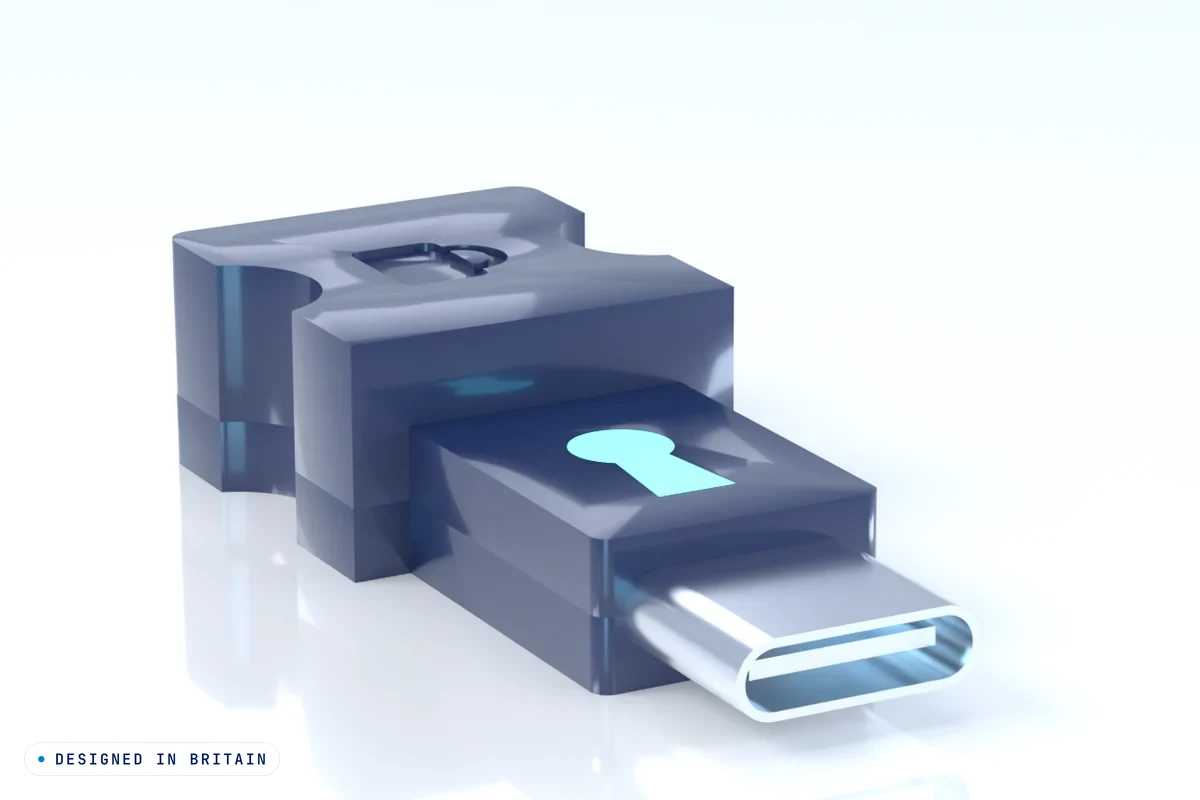
UK registered design applications filed (nos. 6564202 and 6564203, 29 October 2026). Not yet registered.
Specifications
What we know, and what we don't yet
It's still in development, so we'd rather mark unknowns than guess.
| Connectors | USB-C plug to your computer, USB-C socket for your stick or cable. A USB-A adapter is planned for the box TBC |
|---|---|
| Designed to block | Keyboard, mouse and other HID input |
| Designed to let through | Storage and charging |
| Status light | Green tick = allowed, red cross = blocked |
| Software | None: no app, no drivers to install to be confirmed in testing |
| Connectivity | None by design: no Wi-Fi, no Bluetooth, no internet |
| Firmware updates | Offline only, signed file, physical button to confirm TBC |
| Data speed | TBC (we won't quote a speed until we've measured a prototype) |
| Charging power | TBC |
| Size and weight | TBC |
| Materials | TBC |
| Certification | None yet. Safety and compliance marks will be listed only once earned. |
| In the box | TBC |
Reserve your place
Reserve your place: free waitlist or refundable deposit
We're checking there's real demand before we build the first batch. Join the free waitlist (no payment, no card details), or reserve one unit at the £149 early-bird price with a £25 deposit that you can have back in full, on request, at any time before dispatch.
Reserve with a £25 refundable deposit
Reserve one Pyralink™ USB Firewall at the £149 early-bird price. Your £25 deposit counts towards that price, and you pay the £124 balance only when we ask for it. You choose your preferred design, Shield or Stepped Lock, at checkout.
- Refundable in full, on request, at any time before dispatch. No reason needed.
- Refunded without you asking if we don't build it, or haven't dispatched by 30 September 2028.
- Paying a deposit doesn't commit you to buy.
- In development. Estimated dispatch Q3 2027, an estimate only.
- Delivery to UK addresses only.
£25 deposit
Reserve with a £25 refundable depositSecure card payment by Stripe. Prices are in pounds (GBP); if your card is from outside the UK, checkout may show a local-currency price that includes a conversion fee, and you can choose to pay in pounds. Please read the deposit terms first.
Or join the free waitlist instead:
Join the free Pyralink™ USB Firewall waitlist
What reserving means
- Joining the waitlist is free. No payment, no card details.
- It's not a purchase. You're not committing to buy.
- You can also reserve one unit at the £149 early-bird price with a £25 deposit, refundable in full on request before dispatch. See the deposit terms.
- It's in development. Estimated dispatch: Q3 2027 (an estimate, not a promise).
- We'll only email you about the USB Firewall: updates on reservations and deposits, and when it launches. If we decide not to build it, we'll tell you and you owe nothing.
Questions
USB firewall FAQ
What is a USB firewall?
A USB firewall is a small piece of hardware between your computer's USB port and a stick or cable. The Pyralink™ USB Firewall is designed to let storage and charging through and block keyboards, mice and other HID devices, so a stick or cable pretending to be a keyboard can't type commands.
Does it protect against BadUSB and keystroke injection?
That is exactly what it is designed to block: a device that pretends to be a keyboard or other input device (HID) and types commands. It is still in development and hasn't been independently tested yet, so we don't make guarantees.
Does it protect against malicious USB sticks and cables?
Only against one kind: a stick or cable that pretends to be a keyboard, mouse or other HID device. It is not designed to scan files, so a harmful file on a storage stick that is let through is still a risk.
Is it a USB-C data blocker?
No. A simple data blocker cuts the data wires so only power gets through, which is fine for charging but means a memory stick won't work at all. The USB Firewall is designed to let storage and charging through while blocking keyboard, mouse and other HID input.
Does it stop juice jacking?
Juice jacking means a rogue public charging port or cable tampering with your phone or laptop. The USB Firewall isn't designed or sold as juice-jacking protection, and we make no claim that it stops it. For charging only, a simple power-only data blocker is the usual choice.
Does it stop malware on a USB stick?
No. It is not designed to scan or filter files. It is designed to block keyboard, mouse and HID injection, and that's all we claim. Keep your usual protection.
Does reserving cost anything?
Joining the waitlist is free: no payment or card details are taken, and you're not committing to buy. You can unsubscribe at any time. You can also choose to reserve with a £25 deposit, which is refundable in full on request before dispatch.
How does the £25 deposit work?
You can reserve one unit at the early-bird price of £149 with a £25 deposit, which counts towards the price. The deposit is refundable in full, on request, at any time before dispatch, and we refund it without you asking if we don't build the product or haven't dispatched it by 30 September 2028. The balance is paid only when we ask for it. See the deposit terms for the details.
Can I buy one today?
Not yet. The USB Firewall is in development and nothing has shipped. You can reserve one with a £25 refundable deposit. Dispatch is estimated for Q3 2027, and that is an estimate, not a promise. Delivery will be to UK addresses only.
Does it need an app, an account or the internet?
It is designed to need none of them: there is nothing to install and it has no connection to anything.
Will my keyboard or mouse work through it?
No, on purpose. Plug your own keyboard and mouse straight into your computer as usual.
Does it work with a USB-A stick?
A USB-A adapter is planned for the box. TBC
Is it certified or independently tested?
Not yet. It hasn't been built, so there are no certifications and no test results to quote. We'll list them once we have them.
Is this a new idea?
Hardware USB firewalls exist already, and we're not claiming to be the first. We're building a USB-C version with a strict no-data design.
Is the design protected?
We've filed UK registered design applications (nos. 6564202 and 6564203) and a UK trade mark application for PYRALINK (UK00004466909). These are applications, not yet granted.
Who's behind it?
Pyralink Innovation Ltd, a UK cybersecurity product company based in Gateshead. See pyralink.co.uk.