
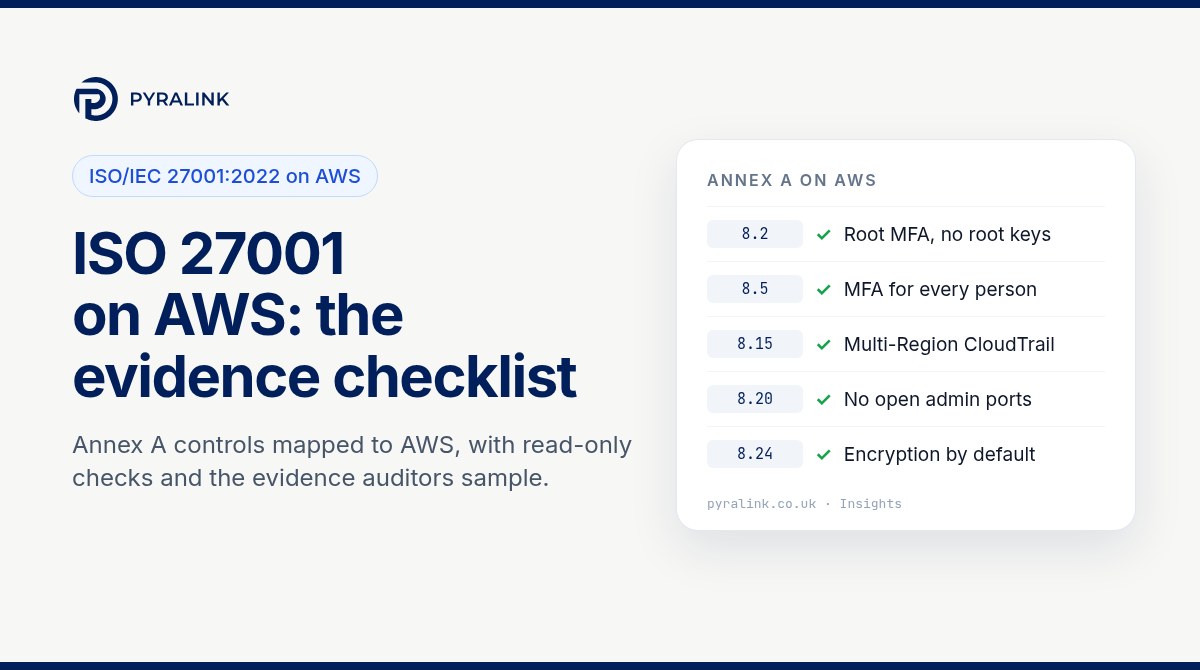
Short answer: AWS holds its own ISO/IEC 27001:2022 certificate, but it does not cover your use of AWS, and your organisation does not inherit it. Your auditor will expect you to define which AWS accounts and Regions sit inside your ISMS scope, show how the relevant Annex A controls are implemented in those accounts, and produce dated evidence that the controls kept working through the audit period. For most cloud-first organisations the controls that need AWS evidence are concentrated in Annex A section 8 (technological controls) plus 5.9, 5.15 to 5.18 and 5.23.
Below: what the AWS certificate gives you, an Annex A to AWS mapping, read-only CLI checks, common audit issues and where AI workloads fit. If your estate is on Microsoft, see our companion ISO 27001 on Azure checklist.
What ISO 27001:2022 asks of an AWS-based organisation
ISO/IEC 27001:2022 has two parts that matter here. Clauses 4 to 10 are the management system: scope, risk assessment and treatment, objectives, internal audit, management review and improvement. Annex A lists 93 reference controls in four themes: organisational (37), people (8), physical (14) and technological (34). You choose which controls apply through your risk treatment and record the decision in a Statement of Applicability (SoA).
AWS does not change those rules. It changes where the evidence lives. On AWS, the physical controls are inherited from AWS, and almost all of the technical evidence sits in AWS Identity and Access Management (IAM), AWS CloudTrail, AWS Config, security groups and AWS Key Management Service (KMS). The 2013 edition is no longer an option for new audits; the transition period for certificates issued against it ended on 31 October 2025.
What the AWS certificate covers, and what it does not
AWS's ISO/IEC 27001:2022 compliance page says AWS holds ISO/IEC 27001:2022, 27017:2015 and 27018:2019 certifications, issued by an independent certification body, and is clear that its certificate does not transfer to customers. It may make your own certification easier, because it covers the AWS security management process over a specified scope of services and data centres.
In practice that means two things for your ISMS:
- You can rely on AWS for what AWS operates. Data centre security, the physical infrastructure and network AWS runs, and the virtualisation layer sit on AWS's side of the shared responsibility model. Download the AWS certificate and its scope from AWS Artifact in the console, check that the services and Regions you use are listed, and keep that copy as supplier evidence. This supports your justification for physical controls in theme 7 and your supplier controls 5.19 to 5.23.
- You own everything you configure. Identities, permissions, network rules, encryption choices, logging, backups and patching of your own operating systems are yours. An SoA that says "covered by AWS" against 8.5 or 8.20 will not survive the first sample.
AWS also published an ISO/IEC 27001:2022 on AWS compliance guide on 31 March 2026, which maps selected Annex A controls to AWS services and covers evidence collection with AWS native tooling. It is a useful reference, not a substitute for your own risk assessment.
Step 1: define your ISMS scope in AWS terms
Write the scope so that an auditor can test it against your AWS Organization. Name the accounts (production, shared services, logging, security), the Regions you use, and whether development and test accounts are in or out. If an account is out of scope, record why, and make sure it cannot reach production data. Auditors regularly find "out of scope" sandbox accounts holding copies of production databases.
For control 5.9, the account list from AWS Organizations and the resource inventory from AWS Config are your asset register for cloud resources. For 5.23, record AWS as a cloud supplier, the services you have approved for use, and the Regions you allow. A service control policy that blocks unapproved Regions turns that written rule into a technical one.
Annex A controls mapped to AWS
The table below covers the Annex A controls where your AWS configuration is the evidence. People controls, most organisational controls and the clauses are evidenced by policies, records and interviews instead.
| Annex A control (2022) | Where it lives in AWS | Evidence worth keeping |
|---|---|---|
| 5.9 Inventory of information and other associated assets | AWS Organizations account list, AWS Config resource inventory, resource tags | Dated list of in-scope accounts and Regions, with an owner for each account |
| 5.15 to 5.18 Access control, identity, authentication information, access rights | IAM Identity Center permission sets, IAM roles and users, your identity provider | User and permission set export, last access review with decisions, leavers matched to removed access |
| 5.23 Information security for use of cloud services | Your AWS contracts, AWS Artifact, the AWS services you have approved | Supplier record for AWS, the downloaded AWS certificate, your list of approved services and Regions |
| 8.2 Privileged access rights | Root user, AdministratorAccess holders, break-glass roles, service control policies | Root user MFA and no root access keys; named list of admins; how admin sessions are granted and logged |
| 8.5 Secure authentication | IAM Identity Center or federated sign-in, IAM credential report | Proof that MFA is enforced for every person, and the credential report showing no unused access keys |
| 8.9 Configuration management | AWS Config recorder and rules, infrastructure as code repositories | Recorder status in every Region in use, your secure baseline, and drift found and fixed over time |
| 8.13 Information backup | AWS Backup plans, RDS automated backups, S3 versioning | Backup plans per in-scope workload and at least one dated restore test |
| 8.15 Logging and 8.16 Monitoring activities | AWS CloudTrail (multi-Region or organisation trail), Amazon GuardDuty, CloudWatch alarms | Trail configuration with log file validation, retention setting, and alerts with the record of who responded |
| 8.20 Networks security | VPCs, security groups, network ACLs, VPC endpoints | No administrative ports open to the internet; a recorded business reason for every public rule |
| 8.24 Use of cryptography | AWS KMS, EBS encryption by default, S3 and RDS encryption settings | Key list with rotation status, encryption-by-default setting per Region, key policies for sensitive data |
| 8.8 Management of technical vulnerabilities | Amazon Inspector, AWS Systems Manager Patch Manager | Findings over the period and the dates they were fixed, against the timescales in your policy |
| 8.32 Change management | Pull requests, deployment pipelines, CloudTrail events for console changes | A sample of changes showing approval before release, and console changes to production explained |
Step 2: run the read-only checks
These AWS CLI commands need only read permissions, such as the AWS managed SecurityAudit policy plus permission to generate the credential report. Run them against every in-scope account. The Region-specific ones (Config, GuardDuty, security groups, EBS encryption, Backup) must be repeated for each Region you use, because those settings are per Region.
# All read-only. Run per account, and repeat Region-specific checks for every Region in your scope.
aws organizations list-accounts --query 'Accounts[].[Id,Name,Status]' --output table

# 8.2 / 8.5: root user MFA (1 = on) and root access keys (0 = none)
aws iam get-account-summary --query 'SummaryMap.[AccountMFAEnabled,AccountAccessKeysPresent]'

# 8.5: credential report (MFA per user, key age, last use)
aws iam generate-credential-report
aws iam get-credential-report --query Content --output text | base64 -d > credential-report.csv

# 8.15: trails, multi-Region coverage and log file validation
aws cloudtrail describe-trails --query 'trailList[].[Name,IsMultiRegionTrail,IsOrganizationTrail,LogFileValidationEnabled]' --output table

# 8.9: is AWS Config recording in this Region?
aws configservice describe-configuration-recorder-status --region eu-west-2

# 8.16: GuardDuty detector in this Region
aws guardduty list-detectors --region eu-west-2

# 8.20: security groups with a rule open to the whole IPv4 internet
aws ec2 describe-security-groups --region eu-west-2 --filters Name=ip-permission.cidr,Values=0.0.0.0/0 --query 'SecurityGroups[].[GroupId,GroupName]' --output table

# 8.24: EBS encryption by default (per Region) and S3 account-level public access block
aws ec2 get-ebs-encryption-by-default --region eu-west-2
aws s3control get-public-access-block --account-id 111122223333

# 8.13: backup plans
aws backup list-backup-plans --region eu-west-2
Save each output with the date, account ID and Region. One run is a baseline; the same checks on a schedule become evidence for an audit period.
Step 3: keep evidence for the whole audit period
A certification audit looks at whether controls operate, not just whether they exist. After certification, surveillance audits usually happen every year and recertification every three years, and each one samples from the months since the last visit. Auditors increasingly ask for:
- Access reviews at the frequency your policy states, with the reviewer's decisions, not just the user list.
- CloudTrail retained for the period your logging policy sets. Event history in the console keeps 90 days of management events, so longer retention needs a trail delivering to S3.
- Config and security findings over time, showing when drift was detected and when it was fixed.
- A dated restore test for each critical backup plan.
- Change records you can match to CloudTrail events for production accounts.
Much of this evidence can be reused. Our SOC 2 on AWS checklist and Cyber Essentials on AWS checklist use the same IAM, network and logging data, so collect it once and map it to each framework.
Issues that often come up on AWS audits
- Root user used for routine work, or root access keys still present. Both are easy to see in the account summary and credential report.
- Logging in one Region only. A single-Region trail, or Config recording only in the home Region, leaves gaps an auditor will find when they ask about a resource elsewhere.
- Long-lived IAM user keys for people and pipelines, often years old and unused. Prefer IAM Identity Center for people and roles for workloads.
- Administrative ports open to the internet, such as SSH or RDP from 0.0.0.0/0, usually left from a test. Our guide to common cloud misconfigurations covers how to fix these and show they stay fixed.
- EBS encryption by default left off. New S3 objects have been encrypted by default since January 2023, but EBS encryption by default is a per-Region setting you have to turn on.
- An SoA that does not match reality, for example claiming 8.16 monitoring when GuardDuty findings go to an inbox nobody reads.
AI workloads in your own AWS account belong in scope
More organisations are choosing to run AI in their own environment so that they keep control of their data. That is a sound choice for sovereignty, and it also means the AI services sit inside your ISMS. If you use Amazon Bedrock or host models on your own instances, include those accounts in scope, record the approved models and Regions under 5.23, apply the same access, logging and encryption controls, and add AI-specific risks to your risk register. Our Amazon Bedrock security checklist covers the settings to check, including model invocation logging, which is off by default.
Where PyraLink™ Prove fits
PyraLink™ Prove does the evidence part of this job for AWS, Azure and Google Cloud. It connects with read-only access, checks configuration against ISO 27001, SOC 2, Cyber Essentials, NIS2 and DORA, and keeps each result as digitally signed, dated evidence records that you can verify independently. It does not decide whether you pass or replace your ISMS; it gives you dated proof of the cloud settings behind your Statement of Applicability, across the period rather than on one day. If you are comparing evidence tools, our comparison pages set out how it differs from other platforms.
ISO 27001 on AWS checklist
- ☐ ISMS scope names the AWS accounts and Regions, with reasons for anything excluded
- ☐ AWS certificate and scope downloaded from AWS Artifact and filed as supplier evidence (5.23)
- ☐ SoA justifies inherited physical controls and does not claim AWS covers your configuration
- ☐ Root user: MFA on, no access keys, not used day to day (8.2)
- ☐ MFA enforced for every person; no unused or long-lived access keys (8.5)
- ☐ Multi-Region or organisation CloudTrail with log file validation and retention set by policy (8.15)
- ☐ AWS Config and GuardDuty on in every Region in use, with someone responsible for findings (8.9, 8.16)
- ☐ No administrative ports open to the internet (8.20)
- ☐ EBS encryption by default on per Region; KMS key rotation reviewed (8.24)
- ☐ Backup plans for in-scope workloads and a dated restore test (8.13)
- ☐ AI services and model hosting accounts included in scope and the risk register
- ☐ Dated evidence kept for each check through the audit period
Planning the wider certification project, not just the AWS part? Our ISO 27001 certification readiness guide covers the stages from scoping to the Stage 2 audit.
Frequently asked questions
Does AWS's ISO 27001 certificate make my company compliant?
No. AWS is clear that its certificate does not transfer to customers. It covers AWS's own security management for a defined scope of services and data centres. You still need your own ISMS, risk assessment, Statement of Applicability and evidence for the controls you operate in your accounts.
Which Annex A controls can I treat as inherited from AWS?
Mainly the physical controls in theme 7 for AWS data centres, and parts of the infrastructure behind the services you use. Record this in your SoA with a reference to the AWS certificate and its scope. Controls such as access, authentication, logging, network rules, encryption settings and backups remain yours.
How much AWS evidence does an ISO 27001 auditor sample?
It depends on the auditor and your scope, but expect them to pick a sample of users, changes, alerts and resources from the audit period and ask for the record behind each one. That is why evidence collected on a schedule is more useful than screenshots taken just before the visit.
Do AI services such as Amazon Bedrock need to be in the ISMS scope?
If they process information in scope, yes. Treat the AI services and any accounts that host models like other cloud services: approve them under 5.23, apply the same access, logging and encryption controls, and assess AI-specific risks.
Sources
- Amazon Web Services, ISO/IEC 27001:2022 Compliance.
- AWS Security Blog, New compliance guide available: ISO/IEC 27001:2022 on AWS, 31 March 2026.
- Amazon Web Services, Shared Responsibility Model.